Yes, emulators are legal on iPhone. Emulation software itself breaks no law — U.S. courts confirmed decades ago that building software to mimic a game console is lawful — and Apple has allowed retro game emulators on the App Store since April 2024. Downloading an emulator app like GamePod Emu is as legal as downloading a calculator. The legal risk sits with game files (ROMs): making personal backups of games you own is the widely accepted safe path, while downloading copyrighted ROMs from the internet is infringement in most countries. Every compliant App Store emulator ships with zero games.
Are Game Emulators Legal on iPhone?
An emulator is just software that behaves like old hardware — it recreates a console's chips in code, and it contains none of any publisher's games. That distinction is why emulators have survived every major legal challenge. In landmark cases around 2000, U.S. courts held that reverse-engineering a console to build a compatible emulator was fair use, and that precedent still stands in 2026. It is also why emulators are openly distributed by reputable companies rather than lurking in gray corners of the internet.
One honest caveat: we build emulator software, we are not your lawyers, and copyright law varies by country. But the broad picture — emulator app legal, unauthorized game downloads not — is consistent across essentially every jurisdiction that has looked at the question.
Does Apple Allow Emulators on the App Store?
Yes. In April 2024, Apple updated its App Review Guidelines to permit "retro game console emulator apps" worldwide — a genuine turning point, because for the previous fifteen years emulators were only available through jailbreaks or fragile sideloading tricks. The emulator App Store rules in 2026 remain the same in substance: an emulator may be listed as long as it does not bundle or link to copyrighted games and takes responsibility for the content it offers.
That policy is exactly why Game Emulator: GamePod Emu can sit on the official App Store with a 4.7-star rating from more than 7,300 reviews. GamePod ships no games whatsoever — you import your own files through the Files app — which keeps it squarely inside Apple's rules and inside copyright law.
Is Downloading ROMs Legal? Where the Line Actually Sits
This is the part most 2024-era explainers rushed past. The emulator is legal; the game file question depends entirely on how you got the file:
- Backups of games you own: dumping your own cartridges or discs for personal use is the widely accepted safe harbor, and it is the only method GamePod endorses.
- Downloading copyrighted ROMs: grabbing games you never purchased from ROM sites is copyright infringement in most jurisdictions, and rights holders — Nintendo especially — actively pursue the sites that distribute them.
- The "abandonware" myth: copyright does not lapse because a game is old or out of print. A 1992 cartridge is as protected as a 2026 release.
Stick to backups of your own collection and the legality question effectively disappears. Our guide to adding your own ROMs covers the practical side of getting those files onto your iPhone.
Are Emulator Apps From the App Store Safe?
Wondering whether emulator apps are safe is reasonable — the sideloading era trained people to expect sketchy certificates and mystery binaries. App Store distribution changes that math. Every listed emulator passes Apple's App Review, runs sandboxed so it cannot touch data outside its container, publishes a privacy label, and updates through the store like any other app. Nothing expires, and nothing needs re-signing every seven days.
GamePod adds a few trust signals of its own: games run fully offline, files are imported through Apple's own Files app rather than a third-party server, and the developer publishes a privacy policy and terms of use. No app is magically bug-free, so check recent ratings before installing anything — GamePod's 4.7 stars across 7,300+ ratings is a good baseline for what a healthy emulator listing looks like.

What Counts as a "Retro Console" Under Apple's Rules?
Apple has never published an official list — the guideline simply says "retro game console emulator apps," and in practice App Review has accepted systems from the 8-bit era up through the handhelds and consoles of the 2000s. GamePod's twelve supported systems show how far that stretches today: Game Boy, Game Boy Color, Game Boy Advance, NES, SNES, N64, PlayStation 1, PSP, Nintendo DS, Sega Genesis, GameCube, and 3DS.
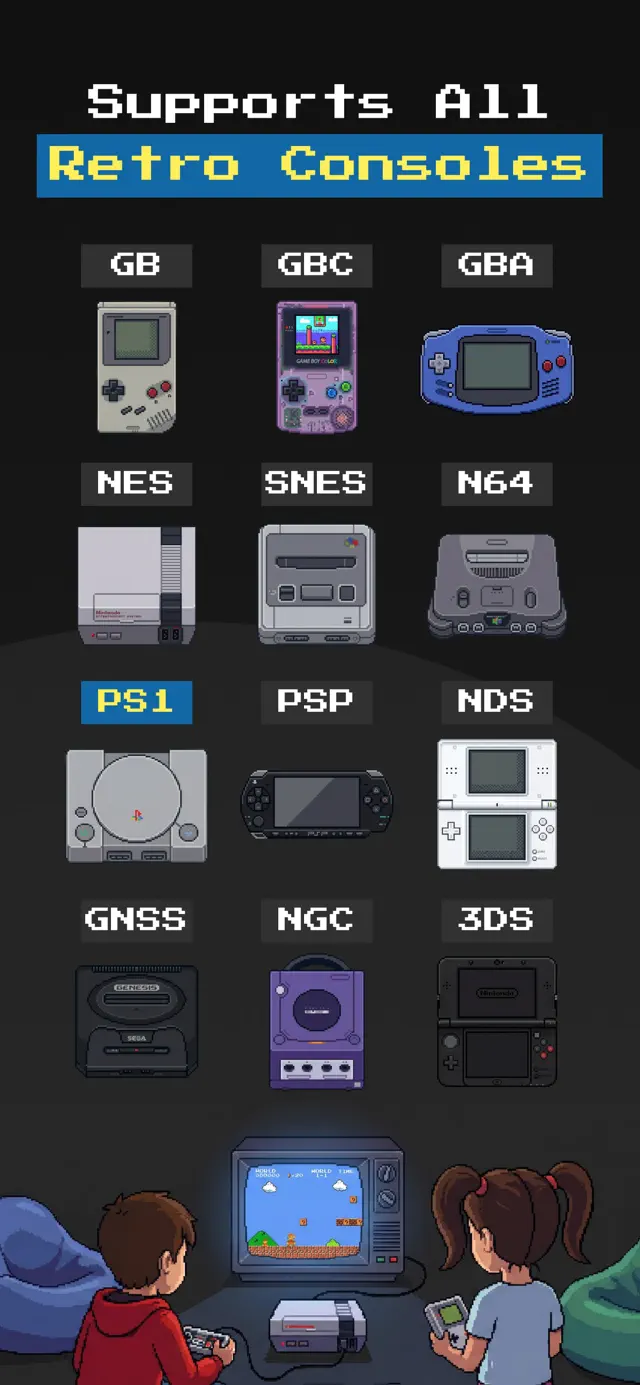
Two honest footnotes. First, GamePod is free to download and play, but some systems and features are part of an optional Pro unlock — check the app for current details. Second, "supported" is not the same as "effortless": N64, GameCube, and 3DS are demanding systems, and performance depends on how recent your iPhone is. The 8- and 16-bit consoles and handhelds run smoothly on essentially anything that can install the app.
Can You Play PS2 Games on iPhone?
Not in GamePod — at least not yet. PS2 emulation exists in the wider emulation world, but it is enormously demanding, and GamePod does not currently support the system, so we will not pretend otherwise. If your collection leans PlayStation, the two systems GamePod does run well are worth a look: PlayStation 1, which handles beautifully on modern iPhones, and PSP, whose library overlaps surprisingly often with PS2-era franchises. If PS2 support ever lands, it will follow the same rule as everything else here: the app is legal, and the games have to be yours.
How to Play Retro Games Legally on iPhone with GamePod
Here is the whole legal path, start to finish — no jailbreak, no sideloading, no gray areas:
- Install an App Store emulator. Download GamePod Emu free from the App Store (iOS 18.6+, iPhone and iPad, about 161 MB). Coming through App Review is itself the trust signal: no bundled games, no expiring certificates.
- Gather backups of games you own. Create personal backup files from the cartridges and discs in your collection. This is the step that keeps you on the right side of copyright law — skip the download sites entirely.
- Move the files to your iPhone. Drop them into the Files app via iCloud Drive, AirDrop, or a cable transfer. The ROM import guide walks through each route.
- Import them into GamePod. Pick the matching console in the console switcher, tap Import, and select your files. Cover art appears in your library automatically.
- Play — fully offline. Use the per-console touch skins with haptic feedback, or pair an Xbox, DualShock, or DualSense controller. SAVE, LOAD, and TURBO buttons plus auto-save keep your progress safe.
Quick Answers
Is it legal to use a GBA emulator on iPhone?
Yes. A GBA emulator app is legal software, and Apple allows it on the App Store. What matters is where your game files come from: personal backups of Game Boy Advance cartridges you own are the safe path, while downloading copyrighted ROMs from the internet is infringement in most jurisdictions. See our GBA emulator guide for setup.
Do App Store emulators expire like sideloaded apps?
No. Sideloaded emulators once needed re-signing every seven days, but App Store emulators like GamePod Emu install permanently, update automatically, and never need a computer or developer certificate.
Could Apple remove emulators from the App Store again?
Apple's guidelines have explicitly permitted retro game console emulator apps since April 2024, and the rule has held steady through 2026. Individual apps can still be rejected for breaking the rules — bundling copyrighted games, for example — which compliant emulators avoid by shipping no games at all.