The best Delta emulator alternative in 2026 depends on why you are looking. Delta's public App Store build handles seven Nintendo systems beautifully, but it has no PlayStation 1, PSP, GameCube, or 3DS support, and Sega Genesis remains limited to a Patreon-gated beta as of July 2026. Game Emulator: GamePod Emu is a free App Store download covering 12 systems — including every one of those gaps. Delta stays excellent at what it does; GamePod exists for everything it doesn't. And since both install from the App Store, you can simply run the two side by side.
Why Look for a Delta Emulator Alternative?
Let's start by giving Delta its due, because pretending it is bad would insult your intelligence. Delta is widely considered the most user-friendly emulator on iOS: a polished, native interface, a superb controller-skin system, cloud save syncing through Google Drive or Dropbox, and a 4.8-star rating across roughly 28,000 App Store ratings. It is free with no ads, and its tip-jar purchases unlock nothing essential. That is honest software, and it deserves its reputation.
So why do so many people search for apps like Delta emulator? Almost always one reason: system coverage. Delta's public build is Nintendo-only, and Nintendo-handheld-and-console-only at that. If your shelf includes a PlayStation, a PSP, a GameCube, a 3DS, or a Genesis, Delta simply has nowhere to put those games. The most common complaint in Delta's own community is that Sega Genesis support has been visible in beta builds since around 2021 and, as of July 2026, still has not shipped in the public App Store version.
What Consoles Does Delta Not Support?
As of July 2026, the public App Store version of Delta plays NES, SNES, Nintendo 64, Game Boy, Game Boy Color, Game Boy Advance, and Nintendo DS. That is the complete list. Missing from it:
- PlayStation 1 — no PS1 core exists or has been announced for Delta.
- PSP — not supported.
- GameCube — not supported, and searches for "Delta emulator GameCube" lead nowhere for a reason.
- Nintendo 3DS — not supported; "Delta emulator 3DS" support does not exist either.
- Sega Genesis — feature-complete in the Delta 2.0 beta, but that beta is gated behind Patreon via AltStore PAL and TestFlight. It is not yet in the public App Store build, and the 2.0 release has slipped past its "early 2026" target.
None of this is a scandal — Delta's developer focuses on doing fewer systems very well. But if any of those five names is why you are here, no amount of polish in Delta's DS emulation will help you.
GamePod vs Delta: The Full Comparison
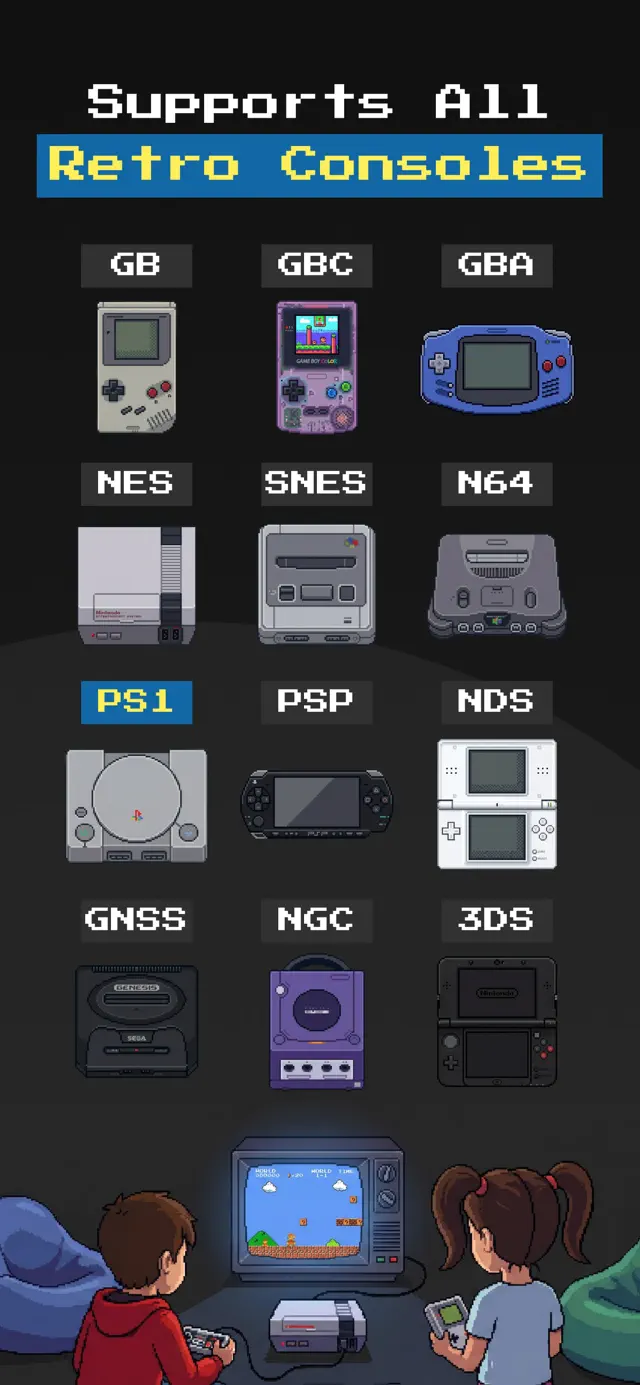
Here is the GamePod vs Delta picture side by side, with only verified facts in the Delta column. GamePod Emu covers 12 systems: Game Boy, GBC, GBA, NES, SNES, N64, PS1, PSP, Nintendo DS, Sega Genesis, GameCube, and 3DS.
| Delta (public App Store build) | GamePod Emu | |
|---|---|---|
| Systems | 7 — NES, SNES, N64, GB, GBC, GBA, DS | 12 — adds PS1, PSP, GameCube, 3DS, Genesis |
| PS1 / PSP | No — no PS1 core exists or is announced | Yes |
| GameCube / 3DS | No | Yes — demanding systems; performance depends on your device |
| Sega Genesis | Patreon-gated 2.0 beta only, as of July 2026 | Yes, in the App Store build |
| Price | Free, no ads; optional tip IAPs; Patreon gates beta builds and experimental features | Free download; some systems and features require a Pro in-app purchase |
| Controllers | Xbox, PS4/PS5, Switch Pro, Joy-Con, MFi; importable custom skins | Xbox, DualShock 4, DualSense via Bluetooth; per-console touch skins |
| Save syncing | Delta Sync via Google Drive or Dropbox | Save states plus auto-save, stored on device |
| Rating | 4.8★, ~28,000 ratings | 4.7★, 7,300+ ratings |
| Source | App Store (since April 2024) | App Store, iOS 18.6+, iPhone & iPad |
Two honest notes on the GamePod column. First, the app is free to download, but not everything in it is free — some consoles and features sit behind an optional Pro upgrade. Second, GameCube, 3DS, and N64 are heavy systems to emulate anywhere; newer iPhones handle them far better than older ones. If a comparison page tells you every 3DS game runs perfectly on every device, it is selling you something.

When Is Delta Genuinely the Better Choice?
If your collection is entirely Game Boy through Nintendo DS, keep Delta — full stop. Its interface is arguably the most refined of any iOS emulator, Delta Sync is a real advantage if you hop between an iPhone and an iPad, and features like online DS multiplayer and RetroAchievements are all free. Nobody honest about this space would tell a GBA-only player to switch.
What about Delta vs RetroArch on iOS? RetroArch covers 50+ systems for free but is famously clunky to set up — per-core installs and weak Files integration make it feel like a port, not an iOS app. Provenance is another App Store option with broad coverage. GamePod's pitch against all of them is a middle path: much wider coverage than Delta, with a native, library-style iOS experience instead of RetroArch's menus. Where GamePod wins outright is breadth in one app: GameCube, 3DS, PSP, PS1, and Sega Genesis sitting next to your Nintendo library in a single place.
Can You Run Delta and GamePod Side by Side?
Yes, and frankly this is what many people should do. Both are normal App Store apps: they install independently, store their own libraries, and never conflict. A ROM file in the Files app can be imported into either one, and the same Bluetooth controller works with both. Plenty of players keep Delta for GBA and DS — where its skins and sync shine — and open GamePod when they want a PS1 RPG, a PSP racer, or a GameCube session. This is not an either/or decision, and any page telling you to delete Delta first is being dramatic. Try GamePod for the systems Delta lacks; keep whichever combination fits your shelf.
How to Try GamePod Alongside Delta
The whole setup takes about ten minutes, and you never have to touch your Delta library.
- Install GamePod Emu. Download Game Emulator: GamePod Emu free from the App Store. It needs iOS 18.6 or later and runs on iPhone and iPad — right alongside Delta.
- Move your ROMs to the Files app. Copy backups of games you legally own — the PS1, PSP, GameCube, 3DS, or Genesis files Delta cannot open — via iCloud Drive, AirDrop, or USB. Our ROM import guide walks through each route.
- Import them into GamePod. Open the app, tap import, and select your files. Each game appears in the library with cover art, sorted under its console in the switcher.
- Pair a controller (recommended). In iOS Settings, connect an Xbox, DualShock 4, or DualSense pad over Bluetooth — likely the same one you use with Delta. See our controller setup guide for details.
- Play, save, and load anywhere. Launch a game and use the SAVE and LOAD buttons for instant save states, auto-save as a safety net, and TURBO to skip the slow parts. Everything runs offline.